Tuesday, August 06, 2024

Geany in dark mode on KDE

 This is how to get Geany into light mode using KDE.  My KDE is already in light mode so I am unsure why Geany opens in dark mode.  Open the KDE menu and go to geany then right click > edit.  Then click Applications tab at the top.  In the line 'Environmental variables' add this

GTK_THEME=Breeze


Tuesday, July 30, 2024

LibreOffice Writer stuck in dark mode

I was able to force LibreOffice Writer into light mode by editing this line to the libreoffice-writer.desktop file found here

/home/USERNAME/.local/share/applications/


You can see your available theme names here

/usr/share/themes/

Orig : 

Exec=libreoffice --writer %U

Edit :

Exec=env GTK_THEME=Breeze libreoffice --writer %U

NOTE THIS HAD TO BE CHANGED ON 2 DIFFERENT LINES


Monday, July 29, 2024

KDE custom keyboard shortcuts using kdotool

For my job I have many windows open across multiple desktops and I often need to get back to a window on a different desktop quickly, or pressing ALT+Tab isnt a good option because I have 5+ windows open.

In KDE system settings search for 'shortcut' then click Add New button > 'Command or Script' and use a command like this

kdotool search --name slack windowactivate


After that click 'add custom shortcut' button and press the keyboard combo you want.


Wednesday, July 24, 2024

Brave browser and Vivaldi won't open in KDE

 Ran into a weird issue today - suddenly Brave and Vivaldi refuse to open.  Same for Brave Beta.  Running from the command line I see something like this

[15524:15524:0724/100844.416388:ERROR:process_singleton_posix.cc(226)]
read() failed: Connection reset by peer (104)

[15524:15524:0724/100844.550935:ERROR:browser_main_loop.cc(278)]
GLib-GObject: g_type_add_interface_static: assertion 'G_TYPE_IS_INSTANTIATABLE (instance_type)' failed
[15524:15524:0724/100844.550956:ERROR:browser_main_loop.cc(278)]
GLib-GObject: g_type_interface_add_prerequisite: assertion 'G_TYPE_IS_INTERFACE (interface_type)' failed
[15524:15524:0724/100844.550963:ERROR:browser_main_loop.cc(278)]
GLib: g_once_init_leave: assertion 'result != 0' failed
[15524:15524:0724/100844.550966:ERROR:browser_main_loop.cc(278)]
GLib-GObject: g_type_add_interface_static: assertion 'G_TYPE_IS_INSTANTIATABLE (instance_type)' failed
[15524:15524:0724/100844.550969:ERROR:browser_main_loop.cc(278)]
GLib-GObject: g_type_register_static: assertion 'parent_type > 0' failed

I fixed this by chance by going into the KDE settings > Appearance and changing everything back to Breeze.  And under 'Application Style' on the bottom right I clicked 'Configure GNOME/GTK Application Style' and changed that to Breeze (it was blank before).  Did not have to reboot and all browsers launch ok now.  Did have a slight delay with Vivaldi but it seems ok.

Monday, July 08, 2024

Gimp text antialiasing odd color

 On one of my laptops in Gimp the text has this weird teal color on the anti-aliasing part.  If I turn off anti-aliasing the text color is normal.  

The text itself is white, but because the tint around it is not, it makes the text look not-white.  I tried resetting Gimp to default, this didn't help.  I uninstalled Gimp and tried to delete all files in /home/.config - then rebooted and installed fresh.  This did not seem to help either.

The fix seems to be go to Image > Precision change to 32 bit.  Before it was on 8 bit.  I have no idea how or why.   This was happening on brand new images, not some old / existing image that was set to 8 bit incorrectly.

Wednesday, May 08, 2024

Debian MX Linux cant see emojis

I noticed in MX Linux KDE I can't see most emojis , was able to fix it by installing this then rebooting

apt install fonts-noto-color-emoji

Can now see emojis that previously showed up as boxes


Thursday, April 04, 2024

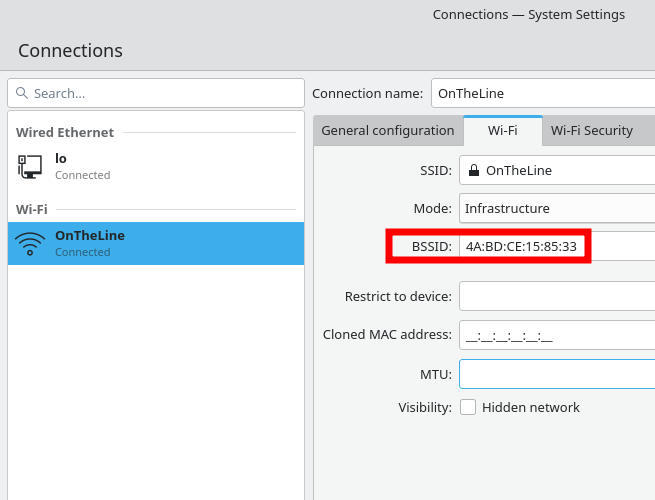
KDE wifi keeps disconnecting intermittently

Recently installed MX Linux and KDE and my wifi keeps disconnecting for half a second then reconnecting.  KDE doesnt tell me that but Facebook and Spotify keep saying I'm offline then right away back online.  I checked dmesg and saw this : 

wlan0: disconnect from AP 4a:bd:ce:15:85:33 for new auth to 4a:bd:ce:1c:85:34

wlan0: authenticate with 4a:bd:ce:1c:85:34

wlan0: disconnect from AP 4a:bd:ce:1c:85:34 for new auth to 4a:bd:ce:15:85:33

wlan0: authenticate with 4a:bd:ce:15:85:33

This happens over and over.

The fix for me was :

  • right click the systray wifi icon
  • go to configure network connections
  • click wifi tab at top
  • click drop down for BSSID and manually pick BSSID


Wednesday, March 27, 2024

XFCE panel increase length of window buttons

In the XFCE bottom bar I notice even when I have free space the window buttons do not expand in size which makes them hard to read.  Here is how to make the window buttons in the taskbar bigger in XFCE

Create file

~/.config/gtk-3.0/gtk.css

add this line

.tasklist { -XfceTasklist-max-button-length: 500; }

restart the panel with this command

xfce4-panel -r

After


Before

Tuesday, March 19, 2024

Linux Mint IPv6 not working

All of a sudden my IPv6 wifi isn't connecting.  I change the IPv6 to automatic, automatic dhcp, automatic address only, manual config setting default routes, etc - nothing helps.  At least 1 hr just messing with the settings.  Each time I disconnect wifi  / disable re-enable networking and try again.  No joy each time.

Finally the solution was old school trouble shooting.  Completely delete the wifi connection and re-connect by selecting the wifi network and just typing in the password.  After this is works fine. 

$ping 2606:4700:4700::64
PING 2606:4700:4700::64(2606:4700:4700::64) 56 data bytes
64 bytes from 2606:4700:4700::64: icmp_seq=1 ttl=58 time=152 ms
64 bytes from 2606:4700:4700::64: icmp_seq=2 ttl=58 time=14.2 ms
64 bytes from 2606:4700:4700::64: icmp_seq=3 ttl=58 time=15.9 ms

LibreWolf can't play some YouTube videos

Playing a YouTube video in LibreWolf didn't work and I get the console error

NS_ERROR_DOM_MEDIA_FATAL_ERR --FFmpegDataDecoder : Couldn't open avcodec

It seems to get this to work you need to reboot after making the changes, I don't know why.  Restarting the browser and even deleting the profile didn't help.  Do not ignore this step.

Everything I tried didn't work, then I rebooted, and it worked.

I installed these packages, unsure exactly which 'did the trick'

gstreamer-plugins-ugly

mozilla-openh264

gstreamer-1.20-plugin-openh264

ffmpeg-4

vlc

gstreamer-plugins-libav

libvpx7